
Don’t freak out. Call now for expert help:
1-877-443-2821

Stay calm… don’t do anything rash!
Hard drive failure is one of the most common and frustrating problems for computer users, but it’s also one of the easiest problems to recover from. If you do suspect that your hard drive has failed, your first course of action should always be to turn off your system. Your second should be to get a free consultation from a professional data recovery shop.
Speaking with a professional data recovery service technician is absolutely free, and will at least enable you to get an idea of what you’re dealing with, and when it comes to data recovery, knowledge is power.
Contact us here for a free hard drive evaluation.
If, on the other hand, you suspect that your hard drive is failing (as in, the drive hasn’t died just yet), then by all means do your best to back it up now! Why bother with a recovery service when you don’t need one!
Here Are The Most Common Questions Our Customers Ask (click to read the answer):
What causes hard drive failure?
Do hard drive crash events have to be epic?
What causes external hard drive failures?
How can S.M.A.R.T. help me if my hard drive is failing?
What are the warning signs of hard drive failure?
Are there specific signs for Macbook hard drive failure?
The Specific Causes Of Hard Drive Failure
Hard drives go bad. It’s just a matter of when. Anybody who uses any device with a hard drive inside it is well aware that a hard disk failure will eventually happen at some point. Whether it is due to regular wear and tear, logical failure, physical damage or something else entirely, understanding why hard drives go is a crucial step in determining whether or not they can be fixed and the data they contain can be recovered.
Hard disk drives (or HDD) are mechanical. Most are based on a “spindle and platter” system that works much in the way a record player does. The arm reads the data on the platter, and your system uses it for pretty much everything on your computer.
When complicated devices like hard drives fail, it usually happens in the very early stages of the drive’s lifespan or when it is nearing its end. This is mainly due to the predictable lifespan of its components. However, there are also instances when errors during the production or assembly process can lead to the device failing or acting up even shortly after it is first used. This is why, when hard disk drive damage is not a factor for the crash, there are likely only two scenarios causing it: it could be a new hard disk with an initial manufacturing problem which caused its early failure, or it could be an old hard disk drive with worn-out components that is nearing the end of its expected lifespan. Of the estimated 300 million or so hard disk drives sold every year, about 2% of number will fail. That would make for a conservative estimate of 6 million hard disks failing each year.
Contact us here for a free hard drive failure evaluation.
SSDs Fail Too!
The second type of hard drive, and one that has become extremely popular, is the Solid State Drive or SSD. This type of hard disk uses an electrical cell grid to write data directly to a memory module, exactly like the RAM in your system. These drives read and write data extremely quickly and are a key reason why today’s computers are so fast. For SSD drives, the “blocks” to which data is written do wear out. They can only be written to a certain number of times, and then, without warning, your drive is dead.
Mechanical Failure Is Almost Always The Key
No matter how you look at it, however, the key cause of failure for either an HDD or an SSD is one thing: mechanical failure.
For HDD drives, this means the spindle and platter system may be wearing out or losing precision due to age or heavy use. Hard drive failures can be caused by a number of things. Often, these scenarios can result in what Windows users call the “blue screen of death” or even catastrophic data loss. It is common for mechanical storage devices to crash due to sector failure or simply bad sectors. This means that certain internal mechanical components inside the drive, like the spindle motor, have failed. Another phenomenon known as an adaptive drift can also lead to hard drive failure. This is when the performance of the drive does not coincide with the specific calibrations it is meant to operate on, which then causes a hard drive crash.
Contact us here for a free hard drive failure evaluation.
Hard Drive Crashes Don’t Require Epic, Dangerous Events
When it comes to hard drive crashes, most people will usually assume something dramatic has occurred, such as physical trauma, operating system problems, data corruption or an unsafe environment. More often than not, however, data loss and hard drive crashes may be attributed to to the drive’s old age. As you keep using the hard disk, over time, its components will start to deteriorate, and risk for hard drive failure and permanent data loss goes up. This means that as your hard disk nears its expected lifespan, it will start failing. In fact, most hard disks are expected to fail within 10 years.
When the hard disk fails, it is common to encounter operating system or BIOS boot errors the moment you start the computer. You may also encounter error messages like “USB device malfunctioned” when plugging into a crashed external hard disk. Other physical warning signs of the drive failure may also be noticeable such as beeping, clicking and other strange noises.
Some other key causes include:
- Excessive heat – Either form of drive will fail if used continually in a very hot environment or improperly cooled computer system
- Water Damage – These are electronics, and one of life’s harshest equations is Water+Electronics=Damage. (Read more about water damaged hard drives)
- Static Electricity – A dry environment can make for high amounts of static electricity.
- Lightning or power surges – A mass shock to your computer system can quickly spell the end of a hard drive. Electrical issues, no matter the kind, are generally bad news for any digital media— hard disks, flash drives and USB devices included. SSD drives, mechanical hard disks as well as NAS/SAS storage systems are well known for being highly sensitive to fluctuations in power. This is why power surges or a bad power supply are detrimental to hard drives.
- High Magnetic Fields – Magnets and hard drives of any kind are a bad mix.
- Impact – The parts inside a hard drive are very sensitive. Dropping a drive or laptop may cause immediate hard drive failure
Contact us here for a free hard drive evaluation.
The Specific Causes Of External Hard Drive Failures
External or portable hard drives are even more susceptible to damage than internal or laptop hard drives. This is essentially because they are small, usually poorly padded within their case, and can be dropped at a moment’s notice.
So essentially, all of the causes of internal hard drive failure are the same for external, with a specific focus on Impact or Environmental Hazard. This means that it can be dropped on the ground. Immersed in water. Burned in a fire. It can more easily be affected by a powerful magnet. They can be thrown across the room by a toddler.
Believe us, we’ve seen it all.
Basically, an external drive is more risky than those in a PC or laptop, so saving as little “critical data” on them as possible is always a great idea. But if you need help recovering an external or portable drive, we can do that, too. Even if you think a recovery might not be possible, trust us: 95% of the time, it is.
Contact us here for a free external hard drive failure evaluation.
How S.M.A.R.T. Helps Warn You
S.M.A.R.T., or Self-Monitoring, Analysis, and Reporting Technology, is an early warning system for hard drives that first gained popularity around 2004. SMART does not actually prevent hard disk or SSD failure, but it does warn you of the potential.
When SMART is activated, its analysis and reporting technology will usually warn the user that the hard drive may have issues during the boot sequence. But, the unfortunate fact is that many computer manufacturers do not automatically enable SMART.
A quick web search for your specific model will often tell you if SMART is activated on your computer.
If you have Windows and you want to see your SMART details right now, do this:
First, open a Command Prompt window. (Press the Windows key, type Command Prompt, and press Enter.)
Once you have a Command Prompt window, type the following commands, pressing Enter after each one:
wmic

diskdrive get status
If there are no SMART errors, you should see this:
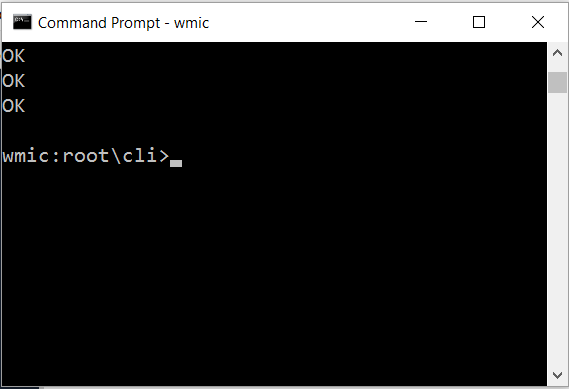
Those 3 OKs mean that yes, you’re OK. Now backup that hard drive!
Warning Signs That Suggest Failure Is Imminent
If you haven’t had the opportunity to check your SMART settings (see above), but suspect that your hard drive may be failing, you may consider the following issues as warnings that a hard drive crash is on its way:
- Computer Crashes Or Blue Screen Of Death – A classic Windows operating system scenario that is all but licked with the newer versions starting at Windows 7 and extending to 8 and now 10. This is why if you do experience a crash, it might be just data corruption, or it may be a big deal. Backup that drive!
- Error Messages While Copying Or Moving Files – Believe us, this is not something that happens unless there are disk problems at hand, including bad sectors. At the very least, it might be a good time to do a SMART test (as above) or do a disk check by going into Explorer (Windows Operating System), right clicking on the problematic drive, clicking the Tools tab and clicking the “Check” button.
- Hard Drive Doesn’t Boot – If you seem to be greeted with a constant boot error whenever you power the computer on, there is a good chance that the hard drive is causing it. In most cases, the error is due to the boot sector of the drive being corrupted. It can also be bad sectors on the drive. In some cases, it may be because the device has been physically damaged.
- Hard Drive Is Making A Beeping Sound – When a hard drive makes a beeping sound, this is usually because the platters may be physically blocked by something. The beeping noises are made by the spindle motor inside the drive as it attempts to get the platters spinning. This generally happens when the read/write headstack clamps down on the platter surfaces instead of floating above them. A professional data recovery service specialist is needed to properly address this issue.
- Hard Drive Is Not Spinning – A hard drive will fail to spin up if there is no electricity that flows through its PCB (or Printed Control Board). This generally happens when the circuit board experiences a short or it has worn out over time. As a result of this, the hard drive fails. This can be caused by power surges or water damage. Failed components such as the PCB should only be handled by the professionals.
- Hard Drive Is Smoking – If you ever see smoke coming from your computer or from your external data storage device, it is a warning sign that the PCB of the hard drive has burned. This is a very rare occurrence, but it does happen. This is mainly due to an electrical surge which may cause the PCB to short or burn. Obviously, powering down the computer is your first and best step. Contacting a professional should be your second step.
- Hard Drive Is Clicking Or Buzzing -When the hard drive makes a clicking or other strange sounds, this is mainly due to the read write heads being unable to perform their key functions. This may be what’s know as a head crash. Mounted on an arm that performs a back and forth swinging motion, when the heads stop functioning, the drive’s arm will keep swinging which is what causes the clicking noise. Also referred to as the “click of death”, this happens when the hard drive has been severely damaged or has failed completely. It is never a good idea to keep running a hard drive that’s making some kind of physical sound. Professional repairs need to be carried out or the condition will only get exacerbated to the point where the disk damage may be irreversible, which could result in permanent data loss. The best thing to do is to stop using the hard disk and have it sent to a professional data recovery facility as soon as possible.
- Losing Files Without Notice – This can sometimes mean that your drive is having issues. A disk check may help.
- File Access Takes A Long Time – Today’s hard drives are fast. If your system was made in the past 10 years, you shouldn’t be waiting long periods of time for your file access.
- Noise – Most recently manufactured hard drives are whisper quiet. Any noise at all, particularly a clicking hard drive noise, can mean the drive may be on its last legs. Do your best to backup whatever you can, or shut down the system and call an expert (our number is above 🙂 ).
Contact us here to determine if your data can be recovered.
MacBook Hard Drive Failure Warning Signs
Suspect that your Macbook hard drive is failing? Well, certainly all of the signs noted above for Windows machines do also work for Mac users, so feel free to go through that checklist.
Fortunately, the folks at Apple have built-in what they call the Apple Hardware Test. Within that module is something called the AHT Disk utility, which does help correct errors and solve disk problems.
If you find that your drive is slowing, it may either be fragmented, or it’s possible it may be failing. Again, back it up to another drive. An external hard drive is extremely handy for this.
(Because today’s hard drives are extremely cheap when compared with even five years ago, it is always worth the expense to buy an external USB hard drive for backup purposes. A 2TB portable drive can often be purchased for less than $60. Consider it a very worthy investment.)
What Happens Next If Your Drive Has Failed?
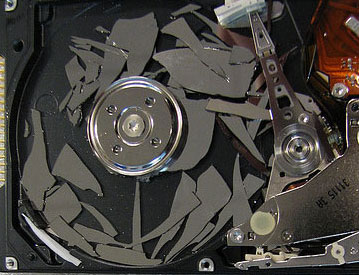
Thankfully, hard drive failure typically doesn’t look like this.
If you call on an expert quickly, and your system isn’t very old, your data is VERY recoverable. Basically, the quicker you discover the drive issue and power down your system, the more effective (and less expensive) your data recovery will be.
Free Hard Drive Failure Consultations
When you call HDRA, a data recovery service technician will ask you a number of questions to determine the cause of your hard disk failure. This is because in many cases, your drive may be mechanically sound, but has issues with its file system (or Logical Failure Errors) that prevents your important files from being accessed.
Many people panic and mistake logical failure for mechanical failure, which can often lead them to rash actions that can further damage their data.
Each day, HDRA technicians help customers troubleshoot these logical errors over the phone, saving them hundreds of dollars in data recovery costs with one call.
In doubt? Find out for yourself by calling the toll free number above!
Can You Repair A Failed Hard Drive?
Compared to other main stream appliances like a dishwasher or fridge, hard disks are simply not meant to be repaired once they fail or crash. This is because rather than being considered an important device on their own, hard drives are mainly just seen as a component that contains important files and information. This means that the data that the hard disk contains is actually valuable and not the disk itself. Just like any commodity, a hard drive is easily replaceable and it rarely makes sense to get it repaired when it crashes.
To get the hard drives fixed so data recovery can be performed, a contaminant-free and clean environment is necessary. A wide array of specialist tools will be required as well. Only trained data recovery engineers can effectively and safely get the hard disks repaired. Still, even after the disk has been repaired, there is no reassurance that it is still going to perform well or even last long as a functioning device. In most cases, once a failed hard disk is repaired, it is usually only going to last long enough for the data it contains to be recovered by data recovery experts.
It’s Mechanical… What Now?
If you describe a situation that tells us that your drive has experienced a mechanical failure, we will likely request that you ship the drive to our lab. This is to see how badly damaged your drive is, and to find out what the best and least expensive way of recovering the data will be.
To get the hard drives fixed, a contaminant-free and clean environment is necessary. A wide array of professional data recovery specialist tools will be required as well. Only trained data recovery engineers can effectively and safely get the hard disks repaired. Still, even after the disk has been repaired, there is no reassurance that it is still going to perform well or even last long. In most cases, once a failed hard disk is repaired, it is usually only going to last long enough for the data it contains to be recovered by data recovery experts.
— Hard Drive Recovery Associates (@HDriveRecovery) March 8, 2022
For all in-lab recoveries we perform, we give you the option of either copying the recovered data and important files to a brand new hard drive, or compressing the data so that you can download it from a secure location.
Contact us here for a free hard drive failure evaluation.